

Last Updated: November 10, 2026
Quick Summary
To manage office inventory effectively, build a complete list of every supply and asset by walking the office room by room, then categorise items and standardise shelf labels. Choose a tracking system that matches your office size, set reorder points based on lead time and daily use, and run regular cycle counts to keep records accurate.
- Build your office inventory list room by room rather than by category so nothing is missed.
- A small office of up to about 20 people can run on a shared spreadsheet with a single owner.
- Reorder point equals average daily use times lead time in days, plus a safety buffer.
- Track only your top twenty items by cost or volume to avoid drowning in admin.
- Investigate any variance above 5% of recorded quantity and record a cause code.
Table of Contents
- Step 1: Build Your Office Inventory List
- Step 2: Categorise Supplies and Standardise Labels
- Step 3: Choose a Tracking System, From Free Template to Software
- Step 4: Set Office Supply Reorder Levels and Replenishment Rules
- Step 5: Learn How to Track Office Supply Usage
- Step 6: Run Regular Audits and Cycle Counts
- Step 7: Balance Bulk Buying Office Supplies and Cash Flow
- Open a Credit Account and Put Your Reorder Rules to Work
- Frequently Asked Questions
Step 1: Build Your Office Inventory List
Learning how to manage office inventory effectively starts with one unglamorous task: writing down everything you already own.
An office inventory list is a simple record of every supply and asset you hold, where it lives, and how much you have.
Grab a clipboard and walk the office. Count what you find and note the location. Expect surprises.
- List every item, even half-empty boxes
- Record the location of each item
- Note the quantity on hand
- Flag anything you did not know you had
Once the paper list is done, move it into a spreadsheet the same week.
Step 2: Categorise Supplies and Standardise Labels
Group supplies into clear categories before you label anything. Sensible groups include stationery, printer consumables, janitorial, breakroom and catering, workwear, and IT equipment. Keep the list short.
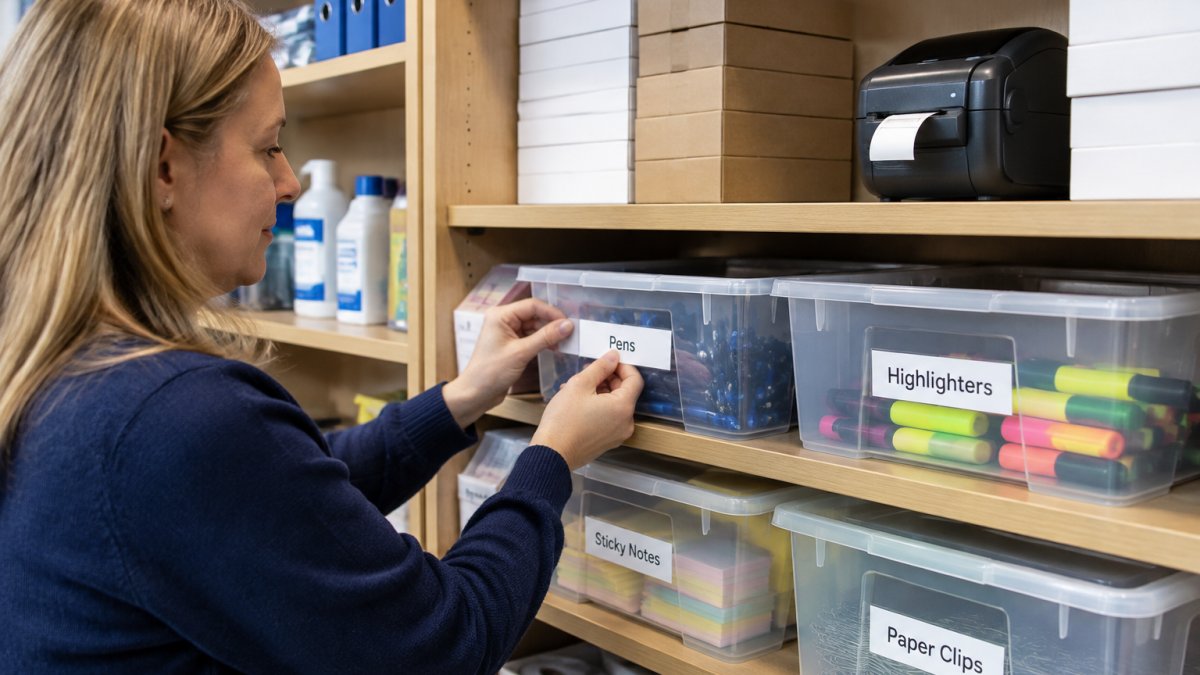
Standardised labelling is where many offices fall short. Handwritten notes can fall off and fade.
The Dymo LabelManager Desktop 360D is a compact desktop printer with a QWERTY keyboard and an LCD screen that previews text before you print. Pair it with Dymo Durable D1 labelling tape, a 12mm black-on-white polyester tape with a self-adhesive backing that is suitable for almost all surfaces.


Label the shelf, not just the item. Every bin gets a name and a category code. Anyone should be able to find the tea bags in under a minute.
Step 3: Choose a Tracking System, From Free Template to Software
The right tracking system depends on your size, your item count, and how many people touch stock. A small office of eight people can run on a shared spreadsheet.
Start with a spreadsheet if you are unsure. It costs nothing and forces you to define your categories properly. Move to inventory management software when you need multiple users, barcode scanning, or automatic reorder alerts.
Match the System to Your Office Size
A phased approach stops you over-buying a system you cannot yet use.
- Small office (up to about 20 people, one site): a shared spreadsheet with a single owner. Add a paper sign-out sheet for anything valuable. Review monthly.
- Growing team (20-100 people, one or two sites): a spreadsheet plus barcode labels for high-turnover items, or a low-cost cloud inventory tool with user permissions. Introduce reorder alerts and a weekly cycle count.
- Multi-site organisation: software with location fields per site, role-based access, and consolidated reporting. Centralise purchasing but let each site count its own stock.
Compare the Three Tracking Methods
| Method | Best for | Strengths | Trade-offs |
|---|---|---|---|
| Spreadsheet | Small teams, low SKU count | Free, flexible, easy to audit | Manual entry, version control risk, no scanning |
| Barcode labels + scanner | Medium offices, stockrooms | Faster counts, fewer keying errors | Label and scanner setup cost, staff training |
| Inventory software | Multi-site, high value, many users | Permissions, alerts, reporting, audit trail | Subscription cost, setup time, overkill for small teams |
Barcodes are a practical middle step between a spreadsheet and full software.
What an Office Inventory Spreadsheet Template Should Include
A good template carries more than item names. Build these columns into yours:
| Column | What It Records |
|---|---|
| Item name and code | Standard description for ordering |
| Category | Stationery, janitorial, catering and so on |
| Location | Shelf, room or bin reference |
| Quantity on hand | Current stock level |
| Minimum stock level | The point that triggers a reorder |
| Reorder quantity | How much to buy each time |
| Supplier and lead time | Who supplies it and how long delivery takes |
| Last counted | Date of the most recent check |
| Unit cost | Price paid per item, for spend reporting |
| Owner | Person accountable for that category |
Keep one master copy. A shared file with three versions is how duplicate orders happen. Lock the master to one editor and give everyone else view or comment access.
Set Up in a Weekend
A workable implementation sequence for a single-site office:
- Export or build your item list from the Step 1 walkthrough.
- Assign categories and location codes.
- Add minimum levels and reorder quantities for your top twenty items by cost or volume.
- Label shelves and bins to match the location codes.
- Nominate one owner and one backup.
- Run a trial count of one category and compare it with the sheet.
Watch out: choosing software before categories are stable usually means migrating data twice within a year.
Step 4: Set Office Supply Reorder Levels and Replenishment Rules
Office supply reorder levels are the minimum quantities that trigger a new order. Set them too low and you get stockouts.
Work backwards from lead time.
Use this simple formula:
Reorder point = (average daily use × lead time in days) + safety buffer
A worked example. You use two boxes of A4 paper a day and delivery takes two days. That is four boxes during the wait.
Set a maximum stock level too. It stops well-meaning staff from ordering a year's worth of highlighters in one go.
Step 5: Learn How to Track Office Supply Usage
Tracking usage means recording what leaves the cupboard, not just what arrives. Without it, you are guessing at reorder points and demand forecasting.
Keep it light. A sign-out sheet works for small teams. A shared spreadsheet with a weekly tally works better.
Watch for consumption patterns. Our guide on tracking office supply spend effectively goes deeper on the numbers. If you need to see usage per person, read how to track employee supply spending.
A common mistake is tracking everything and drowning in admin. Track your top twenty items by cost or volume. Leave the paperclips alone.
Step 6: Run Regular Audits and Cycle Counts
A cycle count is a partial stock check of selected items on a rotating schedule. By checking selected items regularly and correcting discrepancies as they appear, you can keep records for everything from everyday supplies to SubAssembly components aligned with what is actually on hand.
Run a short count every week or month. Pick one category, count it, and compare the result with your records. Fix the discrepancies and note the cause.
- Weekly: high-value or fast-moving items
- Monthly: one full category, rotating
- Quarterly: workwear and equipment
- Annually: full physical count for accounts
Worked Example: Reconciling a Count
Suppose your sheet says 24 boxes of A4 paper. You count 21. The variance is three boxes, or 12.5% of recorded stock. Record the count, the variance, and a cause code: unrecorded issue, delivery not booked in, damage, or unknown.
Inventory accuracy is the share of counted lines that match records. Track it each month. If accuracy sits below about 95%, the problem is usually process, not people: issues are not being logged, or deliveries are not booked in on arrival.
Close the Full Lifecycle: Receiving, Returns and Disposal
Counting only works if everything that enters and leaves the cupboard is recorded.
- Receiving: check deliveries against the order, count them, and book them into the sheet the same day. Note short deliveries and damaged goods immediately.
- Returns: record returns to supplier and credits due. A return that is not logged looks like stock that vanished.
- Damaged and obsolete stock: quarantine it, record the write-off, and remove it from available quantity so reorder points stay accurate.
- Disposal: for IT equipment and anything holding data, follow your own disposal and data-protection procedures before items leave the building.
Measure Performance, Not Just Counts
A short monthly review connects inventory practice to budget. Track four numbers: spend by category against budget, stockout incidents, value of excess or slow-moving stock, and inventory accuracy.
Inventory accuracy only improves if someone owns the process. Name a person. Give them the time to do it, and give them the authority to correct records.
Watch out: counting without recording the cause of each variance turns a cycle count into a ritual that never fixes the underlying process.
Step 7: Balance Bulk Buying Office Supplies and Cash Flow
Bulk buying office supplies and cash flow pull in opposite directions. Big orders lower the unit price but lock up cash and fill your storage with excess inventory.
The fix is discipline, not guesswork. Only bulk buy items you know you will use within a sensible window. Use your usage data to judge that window.
Keep carrying costs in mind. Storage space, insurance, and the risk of items going out of date all count.
Assign Ownership, Approvals and Security for Valuable Assets
Write a short inventory policy. It should state who can order, who approves spend above a set limit, and who counts stock. Without named owners, inventory responsibility drifts and nobody is accountable.
For valuable or sensitive assets, add access control. Locked cupboards for IT equipment and workwear. A sign-out log. Approval required for anything above a threshold you set.
Open a Credit Account and Put Your Reorder Rules to Work
A credit account smooths the gap between ordering and paying. It also makes reorder rules easier to follow, because the person restocking is not waiting on a card approval.
At UK Business Supplies, we offer credit account options for businesses alongside many categories, from stationery and janitorial to catering and workwear. For practical guidance on setting this up, read how to use business credit accounts for supplies.
Set your reorder points, name your owners, and place your first consolidated order. Create my account to bring your supply categories under one account.
Most offices lose time and money to the same three things: no list, no reorder rules, and no owner. Fix those and inventory stops being a headache. UK Business Supplies gives you one place to order stationery, janitorial, catering, and workwear, with credit account options and online delivery tracking to keep spend visible. Create my account and put your inventory system to work.
Frequently Asked Questions
How do you keep track of office supply inventory?
Start with a single inventory list that records every item, its category, storage location and current stock level. Update it whenever stock is received or issued, and back it up with a digital tracking system such as a spreadsheet or inventory management software. Standardised labels on shelves and bins make counts faster and reduce duplicate orders. Review the list at least monthly so it reflects what is actually on the shelf, not what you assumed was there.
How do you set reorder levels for office supplies?
Work out your office supply reorder levels from average weekly usage multiplied by supplier lead time, then add a buffer for busy periods. For example, if you use 10 reams of paper a week and delivery takes three days, set the reorder point at around 30 reams plus a safety margin. Record a minimum stock level and maximum stock level for each line, and review the figures quarterly as consumption patterns change.
How often should you check office inventory?
High-turnover items such as paper, printer toner and breakroom supplies benefit from a quick weekly check, while a full physical inventory count every quarter keeps records accurate. Cycle counts, where you count a section of the cupboard each week on rotation, spread the workload and catch discrepancies early. If stockouts or overstock keep appearing, shorten the interval until the numbers settle.
How can a business reduce office supply costs?
Consolidate purchasing with one supplier to simplify procurement and reduce duplicate items, then track supply usage so you order against real consumption rather than guesswork. Set reorder thresholds to avoid emergency purchases, which usually cost more. Bulk buying office supplies and cash flow need balancing, so use credit account terms to spread large orders and keep carrying costs down. Regular audits also expose excess inventory tying up budget.
